The link is what people get: a PDF, a sales page, a guide, a coupon. It lives in editor → DM → Link and has to start with https://.
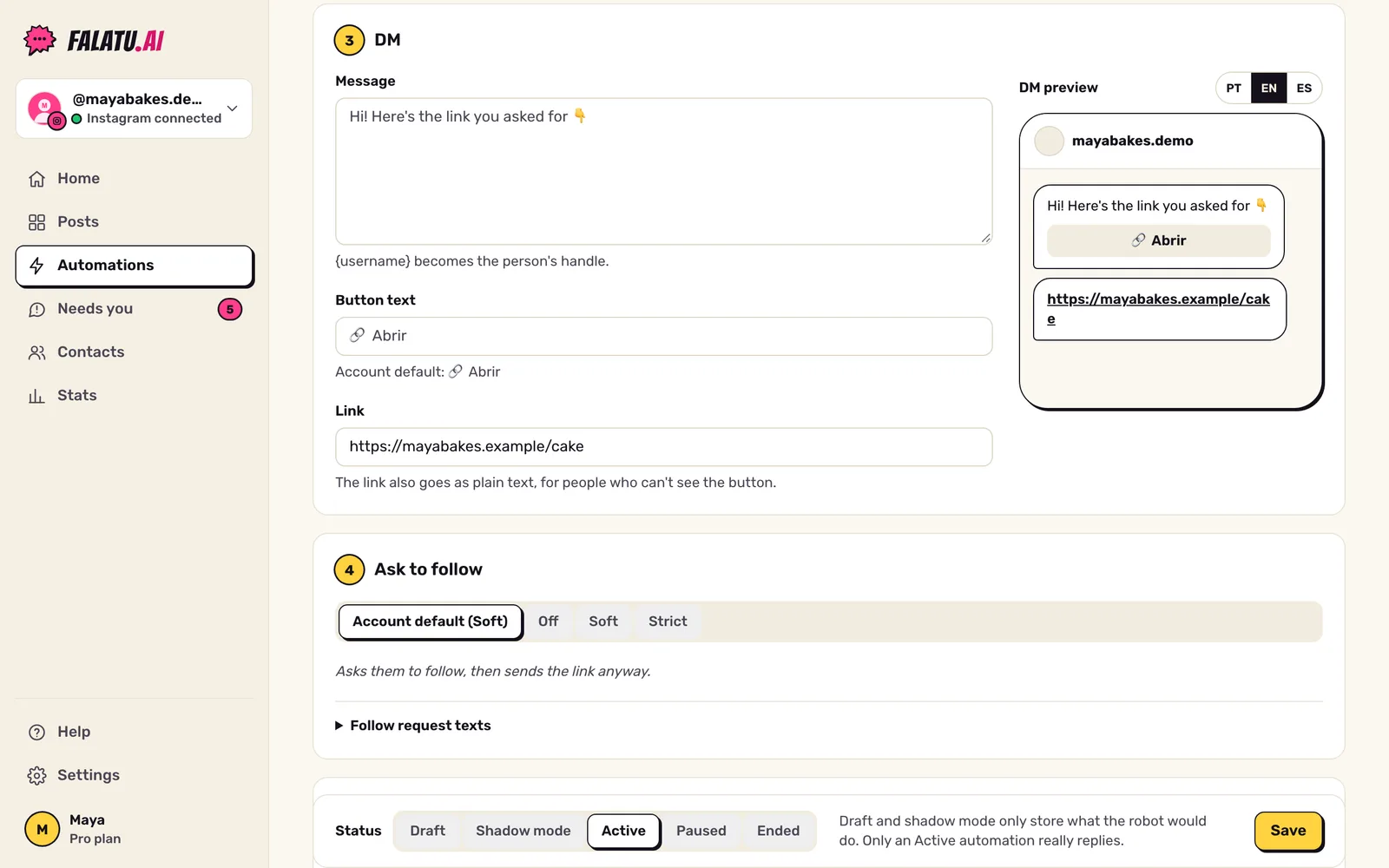
How the link arrives
The delivery message carries all of this together:
- your text ("Here's the guide 👇" by default);
- the link written in the text, on its own line;
- a 🔗 Abrir button.
The link always goes as text too, because the button doesn't show on every phone or on Instagram in a browser. This rule can't be turned off.
You can change the message text and the button label (up to 20 characters) in the editor. {username} becomes the person's handle.
The delivery page
The link can be any page of yours. A tip that works well: one page per word on your site, like yoursite.com/guide. If you add your site's address in Settings → Automation defaults → Your site, falatu tries yoursite.com/WORD on its own when a new post has no link (only if that page is live).
Post with no link
When falatu finds the word but not the link, it looks, in this order, for:
- a link written in the caption;
- the link from another automation of yours with the same word;
yoursite.com/WORD, if you added your site and the page responds;- the link in your bio.
Found one? It shows up already filled in for you to check. Nothing? The field stays empty and you'll see "Link missing". An automation with no link can't be activated.